Trash & Recovery
Accidentally deleted a bookmark? No worries. Deleted bookmarks are not gone forever — they go to the Trash first, giving you a 24-hour window to restore them before they are permanently removed.
How the Trash Works
Here is what happens when you delete a bookmark:
- The bookmark moves to Trash — it is a soft delete, not permanent.
- Trashed bookmarks disappear from search results, collections, and tag counts, so they do not clutter your workspace.
- A background job automatically purges trashed bookmarks after 24 hours.
- If you do not want to wait, you can empty the trash manually at any time.
How to Restore a Deleted Bookmark
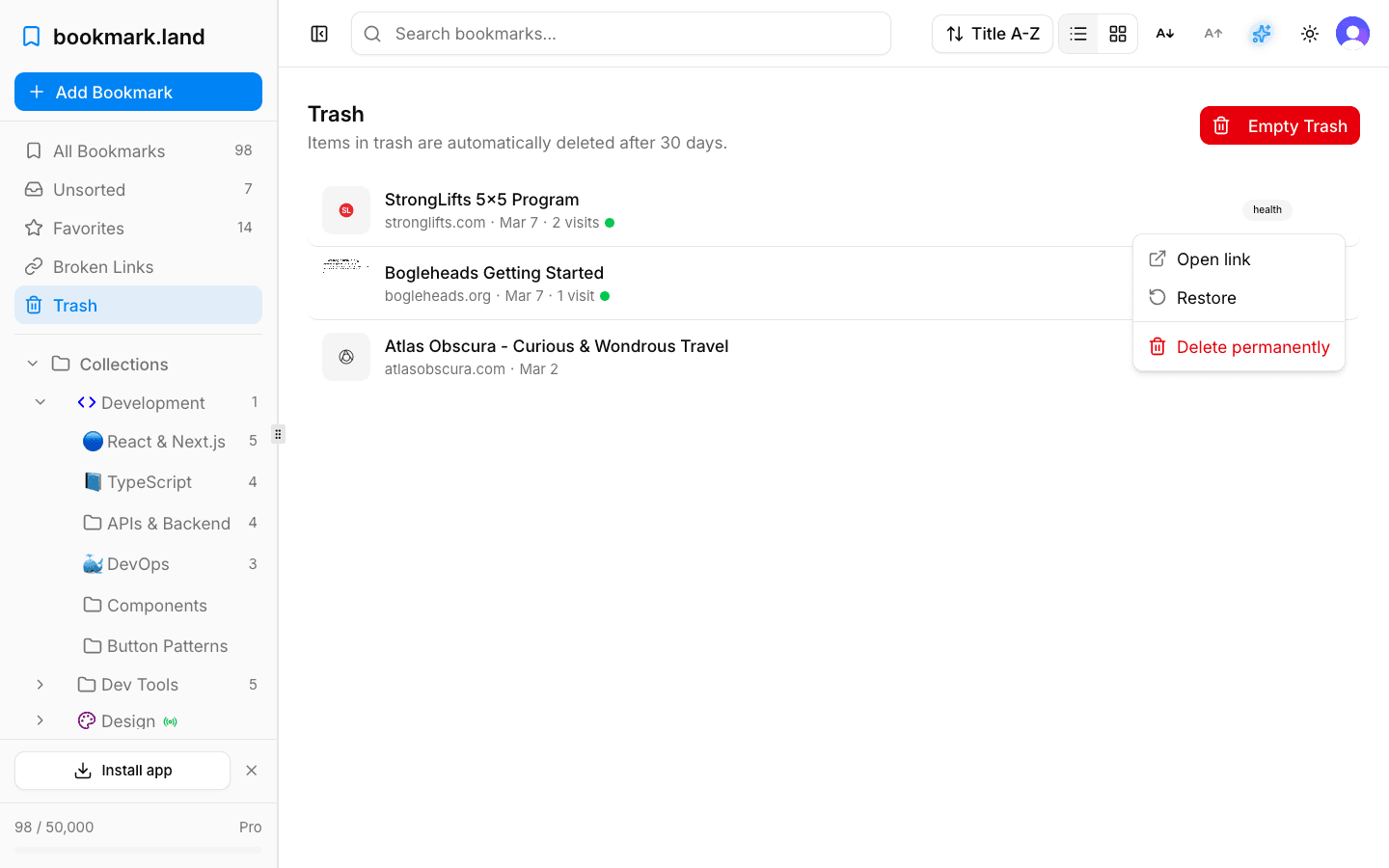
Open Trash from the sidebar, find the bookmark you want back, and click Restore. It goes right back to its original collection with all of its tags and notes intact — exactly the way you left it.
Smart Auto-Restore
Here is a nice touch: if you try to save a URL that is already sitting in your trash, bookmark.land is smart enough to restore the existing bookmark instead of creating a duplicate. Your original tags, collection assignment, and notes are all preserved automatically.
Permanently Deleting Bookmarks
If you are sure you want something gone for good, open Trash, select the bookmark, and choose Delete permanently. Be careful — this action cannot be undone. You can also click Empty Trash to permanently delete everything in the trash at once.
Trashing Large Collections
Moving a collection to trash, or restoring it, moves the collection, its subcollections, and all of their bookmarks in one step. One step can move at most 1,000 items. Bookmarks already in the trash still count until you delete them forever. A larger collection is left untouched and you see an error. To trash it anyway:
- If it has subcollections, move them to trash one at a time first, then the collection itself.
- If it has no subcollections, open it, choose Select all, then Select all bookmarks, and move them to another collection or to trash. Delete trashed ones forever from Trash (or click Empty Trash, which deletes everything in the trash), then move the collection to trash.
To restore a collection that is too large, open Trash, select some of its bookmarks, and choose Restore. They come back unsorted and no longer count toward the collection. Then restore the collection and move them back into it. Do not empty the trash: that permanently deletes the collection you want back.
Frequently Asked Questions
How long do deleted bookmarks stay in the trash?
Trashed bookmarks are automatically purged after 24 hours. If you need to recover something, make sure to restore it before that window closes.
Can I recover a bookmark after it has been permanently deleted?
No. Once a bookmark is permanently deleted — either manually or by the automatic 24-hour cleanup — it cannot be recovered.
Does restoring a bookmark put it back in its original collection?
Yes. When you restore a bookmark, it returns to the exact collection it was in before deletion, with all tags and notes preserved.