Find the link you savedthree months ago.
In one search, not twenty minutes of scrolling browser folders. Import from Chrome, Raindrop, or Pinboard and every link becomes searchable by title, tag, note, or domain.
- Free to start
- No credit card
- Export anytime
See the library you will use
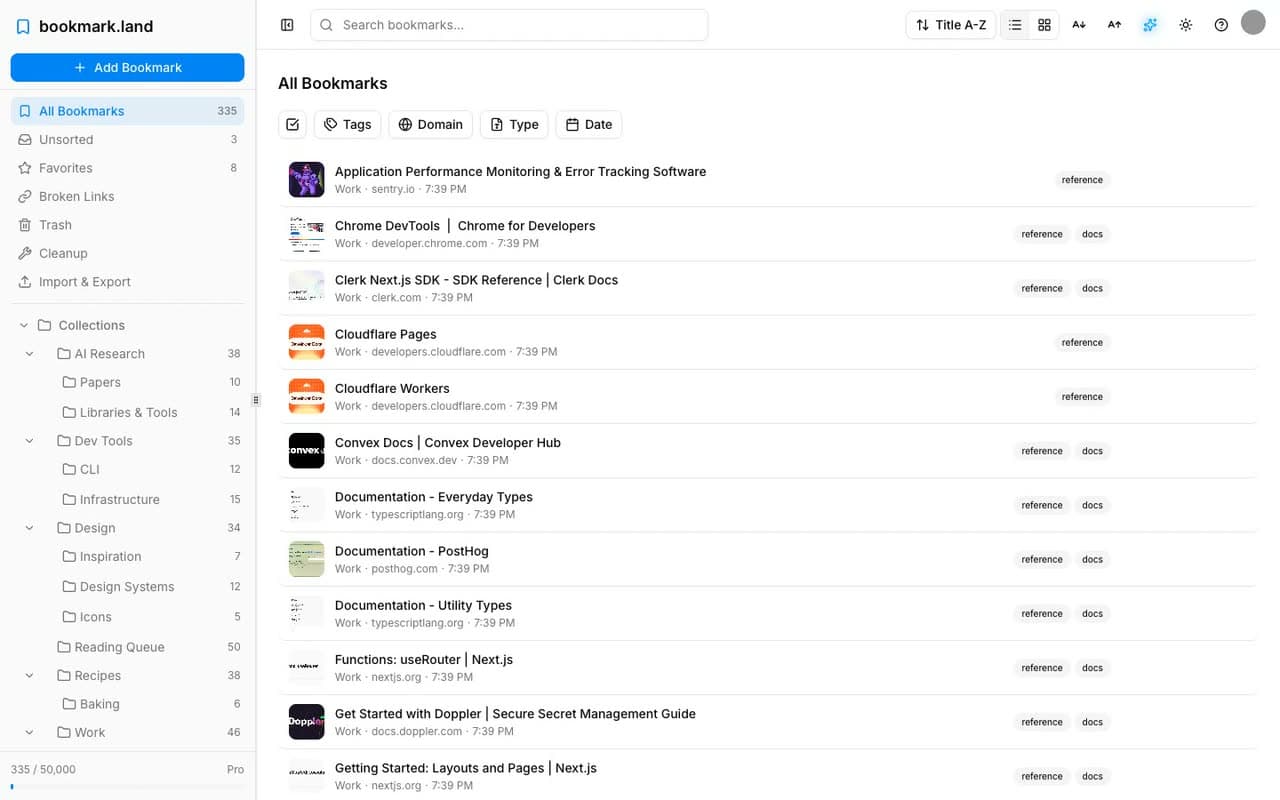
A real library, not a screenshot.
Sixty seconds through an actual account: search, preview, nested collections, a smart folder filing itself, and broken links caught before they mattered.
- Recorded in the live app, no mockups
- Every view you get on day one
- Works the same in light or dark
Coming from somewhere else?
Honest comparisons, including the places other tools are still ahead.
- Switching fromRaindrop.ioSmart folders and link checks without the yearly step upSee the comparison
- Switching fromPocketSomewhere to land now that Pocket has shut downSee the comparison
- Switching fromPinboardThe same durability, with search and a modern interfaceSee the comparison
- Switching fromBrowser foldersOne searchable library instead of a bookmarks bar you scrollSee the comparison
From scattered folders to one search box
- 1
- 2
Search it like you remember it
Type any fragment you recall: a word from the title, the site, a tag, or a note you left. Results group by collection, so context comes with them.
- 3
Let the filing happen later
Nest collections and tag what matters. On Pro, smart folders keep sorting new saves for you, so finding never depends on tidying first.
No credit card required
Everything else it does
Built for the person who can never find the link they saved.
Getting it all in
Move in without retyping
Chrome, Firefox, Raindrop.io, Pocket, Pinboard and more
Separate the good from the rest
Star what you'll come back to, triage the pile later
Keep why you saved it
Notes and highlights, so the reason survives the month
Getting it back
Stop filing by hand
Smart folders sort new saves against rules you set once
Reach anything without the mouse
Keyboard-first search and navigation
Check a page, keep your place
Preview beside the list instead of opening ten tabs
Skim visually or densely
Card grid when you recognize covers, list when you don't
See which repos went quietNew
Bookmarked GitHub projects show their last release and last commit
Keeping it yours
Know what died
Broken and redirected links flagged before you need them
Script it yourself
A REST API with scoped tokens, on paid plans
Leave whenever you like
Full HTML, CSV, and JSON exports on every plan, free included
Read it on a plane
Export a working offline copy, edit, and sync back later
Hand a collection to someone
Public links and polished HTML pages for your team
Follow a collection like a feed
Subscribe to any collection in your RSS reader
Plus the table stakes: a full dark theme that follows your system, an installable app on phone and desktop, and keyboard shortcuts throughout.
Your bookmarks are never held hostage
Your data, always yours
Export your entire library — tags, collections, notes, and highlights — as JSON, HTML, or CSV. Anytime. No restrictions. No lock-in.
Private by default
Your bookmarks are private and encrypted in transit. No ads. No data selling. We only collect the service data needed to operate and improve bookmark.land.
Built to last
Bootstrapped and sustainable — no investors pushing a pivot, no growth-at-all-costs. Pocket shut down and Google Reader closed; we built this because we use it every day and intend to keep needing it.
Simple, honest pricing
Organize and search your first 100 bookmarks free. Upgrade for $2.99/month when your library becomes indispensable.
Explorer
A complete starter library
- Up to 100 bookmarks
- Unlimited collections & tags
- Full-text search & filters
- Import from any browser
- Export to HTML, CSV & JSON
- RSS feeds & shareable collections
- Dark mode & keyboard shortcuts
Infinite Library
For the library you rely on every day
- Up to 50,000 bookmarks
- Everything in Explorer, plus:
- Smart folders with custom rules
- Link health monitoring
- Reader view & content search
- REST API access
Create a free account, then upgrade from Settings for $2.99/mo. Cancel anytime.
Not ready to choose? Start with Explorer and upgrade from Settings whenever you need more room.
Free for students & educators
Sign up with your .edu email. Get 4 years of Pro, free. No credit card needed.
- 50,000 bookmarks for 4 years
- All Pro features included
- Activated instantly, no approval needed

Frequently Asked Questions
Everything you need to know before signing up.
Yes! The Explorer plan is free forever with up to 100 bookmarks, unlimited collections and tags, full-text search, and import from any browser. No credit card required. Already have more than 100? Pro is $2.99/month.
Go to Settings > Import and upload an HTML bookmarks file from Chrome, Firefox, Safari, Raindrop.io, Pocket, or any other service. We process them in batches and preserve your folder structure.
Yes—Explorer is free up to 100 bookmarks. An import fills up to the limit, then reports exactly how many it skipped, so nothing disappears quietly. The remainder stays unsaved. If your library is bigger, upgrade to Pro ($2.99/month, up to 50,000) before importing and the whole library comes over in one pass.
Only if you still have a copy. Mozilla disabled Pocket exports after its shutdown window closed. Nobody reaches your list on your behalf now, us included. If you saved a CSV or HTML export while it was still available, upload it on the Import page and it comes straight in.
Our link checker flags broken or redirected links with visual indicators, and you can re-check links whenever needed.
Absolutely. Any collection can be shared via a public link or RSS feed. You can also export collections as polished HTML pages to hand off to your team.
Your bookmarks are stored securely in the cloud with industry-standard authentication. Every API request is verified against your account. We never sell your data or show ads.
Pro raises the cap to 50,000 bookmarks and adds smart folders with custom rules, link health monitoring, and reader view. It costs $2.99/month or $29.99/year. RSS feeds, shareable collection pages, and export to HTML, CSV, and JSON stay free for everyone.
Yes, you can cancel anytime from your account settings. You'll keep Pro features until the end of your billing period, then revert to the free Explorer plan.
Students and educators get 4 years of Pro free. Sign up with your student email address and it activates instantly.
We're a small, bootstrapped team with low overhead and no venture capital pressure to inflate pricing. We use efficient infrastructure and pass the savings on. $2.99/month covers our costs and lets us build sustainably.
Export your entire library at any time as JSON, HTML, or CSV, with no restrictions. Exports include tags, collections, notes, and highlights. Your data stays yours.