Bulk Actions & Duplicates
Need to reorganize a bunch of bookmarks at once? Bulk actions let you move, tag, and delete multiple bookmarks in one go — so you do not have to edit them one by one.
How to Select Multiple Bookmarks
Hold Ctrl (or Cmd on Mac) and click individual bookmarks to add them to your selection. Use Shift+Click to select a range, or pressCmd+A / Ctrl+A to select everything visible on the page.
As soon as you have bookmarks selected, a bulk action bar slides in at the bottom of the screen. It shows how many items you have selected and gives you quick access to every available action.
What You Can Do in Bulk
- Move to collection — Relocate all selected bookmarks to a different collection in one step.
- Add tags — Apply one or more tags to every selected bookmark at once.
- Remove tags — Strip specific tags from all selected bookmarks.
- Favorite / Unfavorite — Toggle the favorite status for your entire selection.
- Delete — Send all selected bookmarks to the trash.
Finding and Removing Duplicates
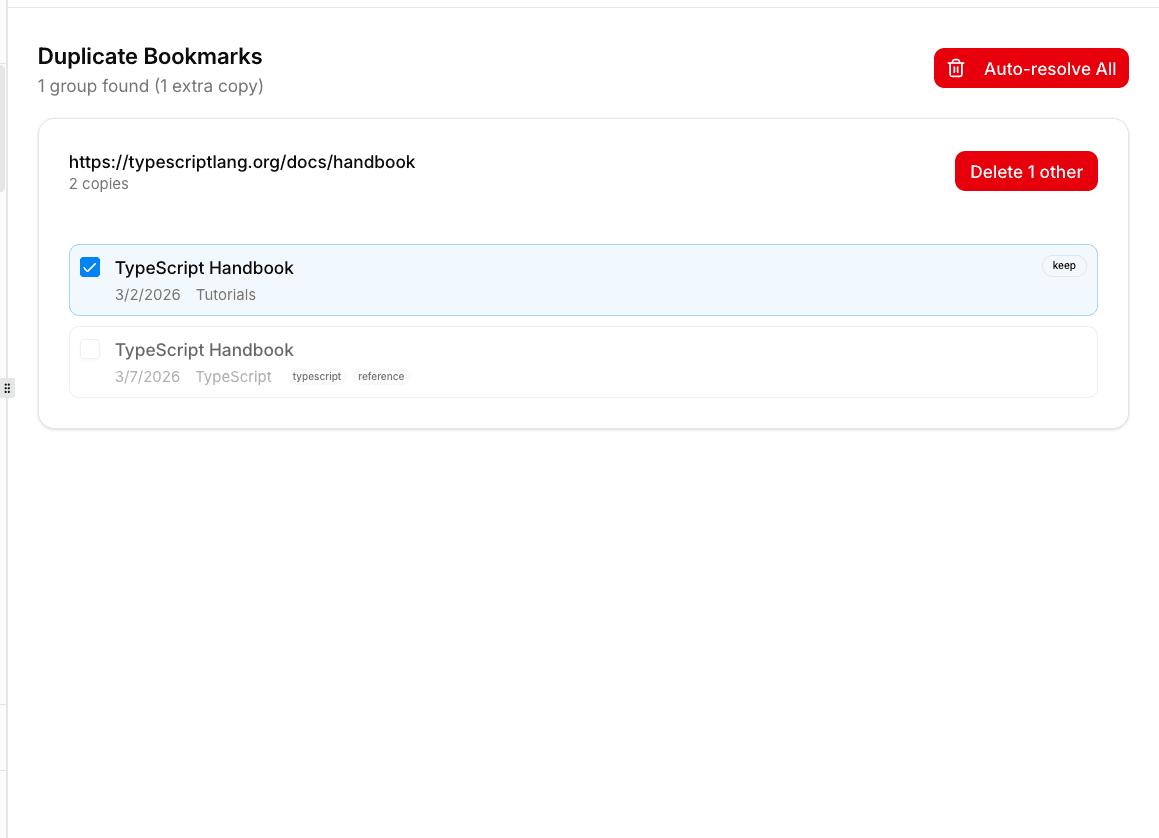
Over time, you might save the same link more than once. To clean things up, head to the Duplicates page from the sidebar. bookmark.land scans your entire library for bookmarks that point to the same URL and groups them together, so you can quickly decide which copy to keep and which to remove.
How URL Normalization Works
When checking for duplicates, bookmark.land normalizes URLs so that minor variations pointing to the same page get caught. Here is what gets normalized:
http://andhttps://are treated as identical- Trailing slashes are ignored
www.prefixes are stripped- Common tracking parameters (
utm_*,ref) are removed
Frequently Asked Questions
Is there a limit to how many bookmarks I can select at once?
No hard limit. You can select all visible bookmarks with Cmd+A /Ctrl+A and apply actions to the entire batch.
Will bulk-deleting bookmarks remove them permanently?
No. Bulk delete sends bookmarks to the trash, where they stay for 24 hours before automatic cleanup. You can restore any of them during that window.
Does duplicate detection catch links with different tracking parameters?
Yes. URL normalization strips common tracking parameters like utm_source,utm_medium, and ref, so the same article saved with different campaign links will be flagged as a duplicate.